Review system

Experts do the review. The system keeps it traceable.

QA4Tech’s review system is built for the Experts who carry out Audit Trail Review as a Service (ATRaaS). It keeps every event linked to the evidence received, and every conclusion linked to its reasoning.

Parallel glass timeline rails carry violet event markers, with a highlighted event linked to an archival block.

Perspective

Audit trail review asks what the recorded evidence can establish about study activity: what changed, who changed it, when, and why. The system QA4Tech’s Experts use for that work asks the same of its own records. Evidence is kept as received, events trace back to their source, checks state their basis and their limits, and no finding exists without an Expert’s reasoning.

Design principle

Conclusions belong to the Expert, not the system.

Automated checks direct attention; they do not decide what the evidence means. A signal becomes a finding only when an Expert assesses it as one, and an Expert can raise a finding from evidence that nothing flagged.

Participant timeline

Separate systems, one recorded participant journey.

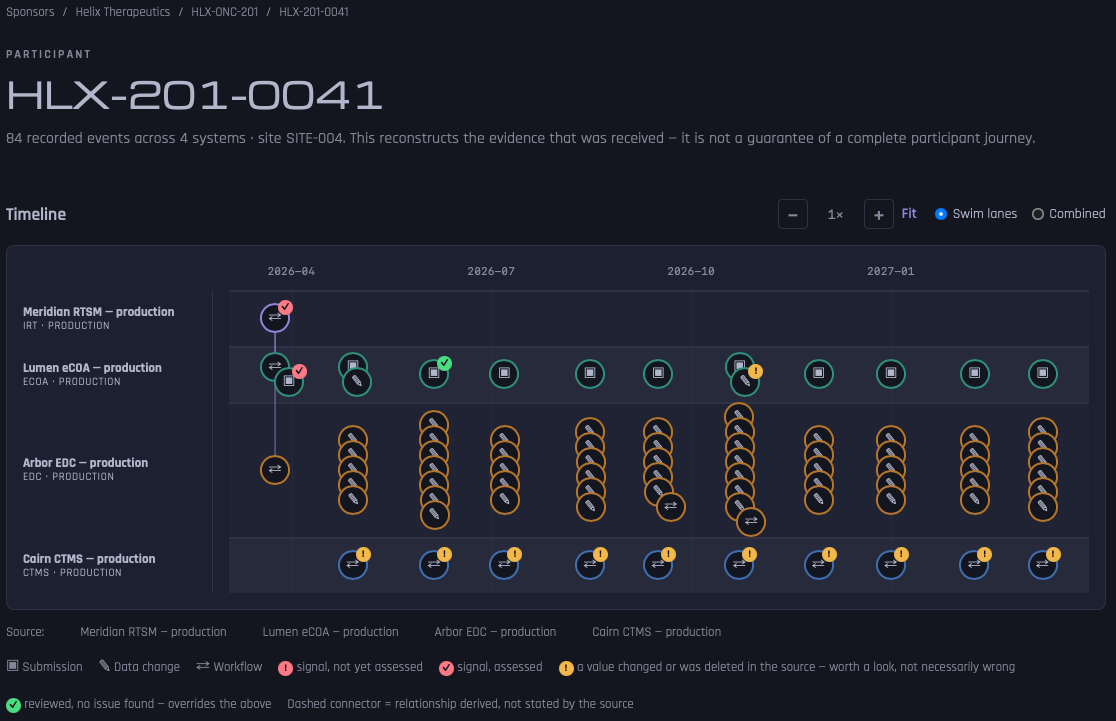
Review is organized around the participant’s study journey as recorded. Each source system can have its own lane, or all can share one, so events from different systems read side by side.

Participant timeline with four horizontal lanes: one each for IRT, eCOA, and EDC systems, and one for another study system. Event markers run across several months and carry symbols for submissions, data changes, and workflow events, some with small flags; a legend below explains every symbol and flag in words.
QA4Tech’s review system in a non-production environment, with fictitious demonstration data: the organizations, study, systems and their environment labels, participant, and dates are invented. Captured under an administrator demonstration account that holds every permission; engagement reviews are carried out under individual Expert accounts. Open full-size image
  • Flags separate signals awaiting assessment, signals already assessed, values the source recorded as changed or deleted — worth a look, not necessarily wrong — and events marked as reviewed.
  • Selecting an event shows what its time represents, the source field of each value, what a changed value replaced, and any signals that cite it.
  • An event with no defensible time is listed separately, never placed at a guessed time such as midnight on a bare date.
  • The view is a reconstruction of the evidence received, not a guarantee of a complete participant journey.

Automated checks and signals

Automated checks show their basis and wait for an Expert.

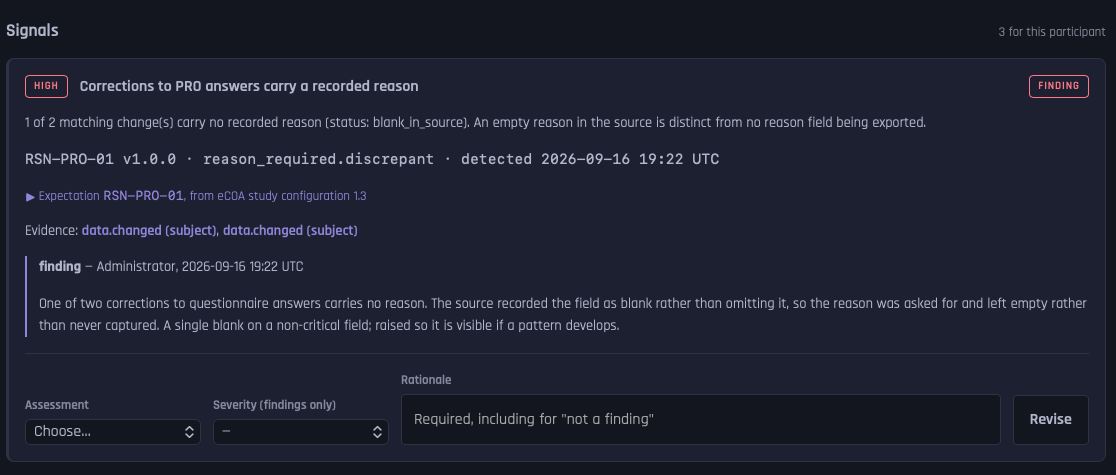
Each check tests one stated expectation — an order of events, a defined time window, or a recorded reason for a change — and shows the versioned study document and text it rests on, so an Expert can judge whether the check matches it. In the fictitious example shown, the reason was asked for and left blank rather than never captured; the Expert records a finding so that a single blank stays visible if a pattern develops.

Signal card titled “Corrections to PRO answers carry a recorded reason”, marked high priority and assessed as a finding. It states that one of two matching changes carries no recorded reason, and that a reason left blank in the source differs from a reason field that was never exported. Below are the rule identifier and version, the study configuration it comes from, links to the cited events, the recorded assessment with its rationale, and a form to revise the assessment that requires a rationale.
A signal with its basis, evidence, and assessment, in a non-production environment with fictitious demonstration data. It was captured under an administrator demonstration account that holds every permission, hence the “Administrator” byline; engagement reviews are carried out under individual Expert accounts. Open full-size image
  • Only a discrepancy, or a check that could not be evaluated, raises a signal.
  • A missing prerequisite makes a check not evaluable, never satisfied: an absent record is not evidence that the activity did not take place.
  • Satisfied and not-applicable results stay listed, so “nothing flagged” can be told apart from “nothing checked”.
  • An Expert assesses each signal — finding, not a finding, or inconclusive — and must give a rationale even for “not a finding”.

Findings

A finding keeps the Expert’s reasoning and its history.

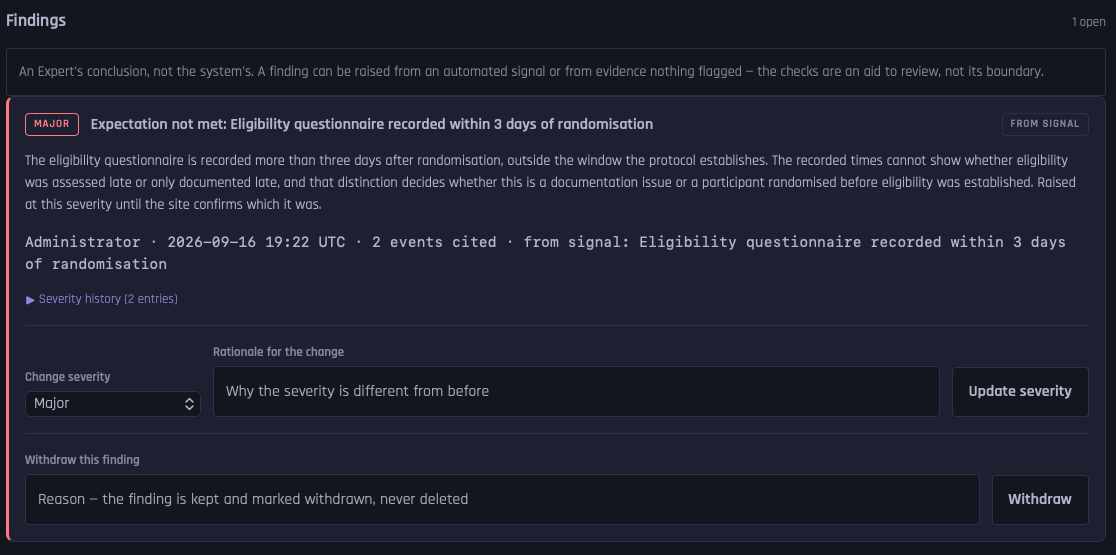
Each finding sets out what was observed, what it means, what was ruled out, and what remains open, and can cite the events it rests on. In the fictitious example shown, the Expert explains why the timestamps cannot settle the question: a late record is not necessarily a late assessment.

Findings panel headed by the note “An Expert’s conclusion, not the system’s”. One finding, marked Major and From signal, concerns an eligibility questionnaire recorded more than three days after randomization, outside the window the protocol sets; its rationale explains that the recorded times cannot show whether eligibility was assessed late or only documented late. Below are a collapsed severity history with two entries, a control to change severity that asks for a rationale, and a control to withdraw the finding with a reason.
A finding raised from an assessed signal, in a non-production environment with fictitious demonstration data. It was captured under an administrator demonstration account that holds every permission, hence the “Administrator” byline; engagement reviews are carried out under individual Expert accounts. Open full-size image
  • Each finding shows whether it came from a signal or was raised by an Expert.
  • Each names its subject: the study, a system, a site, a participant, or, deliberately, no single object.
  • Severity changes only with a stated rationale, and every change is kept in the finding’s history — a severity that changed without a trace is what audit trail review exists to question.
  • A finding that no longer stands is withdrawn with a reason, never deleted.

Evidence intake and lineage

Every event traces back to the evidence received.

A conclusion is only as sound as the evidence beneath it. Which exports a study can provide, and how they are read, are established for each engagement.

01

Fingerprinted on receipt

Each file is kept as received, apart from anything derived from it, with a SHA-256 fingerprint; a repeat receipt is linked, not read again. The fingerprint identifies what was received, not whether the export was complete.

02

A mapping for each study

Each study’s system is mapped on its own terms, even where studies share a product. Mappings are versioned: a released version is not edited, because a correction creates a new version, and a dry run shows a mapping’s effect without changing anything.

03

Every parsed record accounted for

Each parsed record ends in exactly one stated disposition, from “used in an event” to “exception”. There is no category for “nobody looked”.

04

Traceable to the field

Each value names the source field it came from, and the source record can be opened exactly as parsed.

05

Absence kept distinct

A value that was empty in the source, not recorded, not exported, not applicable, unknown, or unparseable keeps that state, so a blank never hides which it was.

06

Re-mapping adds, never overwrites

A corrected mapping creates new representations of the affected events. Earlier ones are marked superseded, not deleted, and a finding keeps citing what the Expert examined.

07

Duplicates established, never assumed

Identical content or equal timestamps prove nothing on their own. A record with the same identity but different content is treated as a conflict, never overwritten.

System-assembled report

The report states what the review could not see.

A report that lists findings without saying what it could not see overstates the assurance it provides. On request, the system assembles a study review report from the current records, in ten fixed sections, with a PDF export. It shows the review’s current state; it is not the review report your team receives, which the Experts prepare, with its scope agreed before work begins.

01

Coverage and limitations

Counted from the data, not written by hand: unattributed events, events with no usable time, changes without a reason, events not fully mapped, systems with no events, and participants not evaluated.

02

Review basis

The study documents and checks the review was performed against, with outcome counts for each check.

03

Findings with their history

Open findings with their full severity history, plus withdrawn findings and signals closed without a finding.

04

Work in progress

Signals still awaiting an Expert. While any remain, the report states that it is provisional.

05

What this report does not establish

The same boundary on every report, including the completeness of the evidence supplied and the correctness of its transformation.

Access and accountability

Access is scoped, and every action is recorded.

Who did what, and with what authority, matters in the review system as much as in the study systems it examines.

  • Permissions are scoped to the whole system, a sponsor, or a single study; a grant for one study does not reach another.
  • Setting up a study and reviewing its evidence happen in separate workspaces, under separate permissions: administering a study establishes no authority over its evidence.
  • An access history, kept apart from the source audit trails under review, records every action, including refused attempts.
  • Accounts are deactivated, never deleted, so past actions stay attributable.

Its place in the service

A tool for the Experts, not the service itself.

Clients engage QA4Tech for Expert review and the review report it produces, whose scope is agreed before work begins. The report sets out scope and coverage, findings with their evidence-linked case records, legitimate explanations and unresolved questions, recommended follow-up, and the method basis.

What it is

  • QA4Tech’s own system, built for its Experts
  • Where Experts examine evidence, flagged or not, and record conclusions with reasons
  • A record of what was checked, what could not be evaluated, and what the review could not reach

What it is not

  • Software for sale or a client portal; direct client access to it is not assumed
  • A decision-maker: no signal becomes a finding, or is closed, without an Expert’s assessment
  • A connection into your study systems: once a confidential disclosure agreement (CDA) is in place, evidence arrives as agreed exports through a secure route such as SFTP

Start a conversation

Discuss the evidence your study systems hold.

A short conversation comes first. The recommended next step, an evidence readiness assessment, establishes what that evidence can support before any wider review.

Discuss Your Study